Step By Step Master Modern Cloud Systems Through Site Reliability Engineering Foundations
Introduction
Site Reliability Engineering helps keep computer programs running without errors. People call it SRE for short. Modern apps need high reliability because people use them every single day. If an app stops, users feel bad. SRE combines smart coding with regular system operations work. Engineers write software to run other software smoothly. You will learn the basics of system health in this clear guide. You will also see how engineers fix broken apps fast. SRESchool.in helps learners understand these key ideas through simple lessons. Anyone can build useful skills with steady effort and daily practice.
What Is Site Reliability Engineering?
SRE stands for Site Reliability Engineering. The main goal is to keep systems alive and fast. Reliability means your app works whenever you tap the screen. Uptime means the system stays awake without crashing. Performance means the app opens quickly and never freezes. Stability means the software runs well even when millions of people visit at once. Engineers use automation to complete boring tasks with short code scripts. Scripts are small programs that run on their own. They also use monitoring tools to watch computer health day and night. Monitoring is like checking a patient’s heartbeat.
Why Does SRE Matter?
People expect their apps to work at any time. When an app crashes, we call it downtime. Slow apps make people angry and frustrated. Service failures can stop a shop from selling goods online. This hurts business trust and costs real money. SRE helps teams catch small bugs before users spot them. It gives engineers fast alarms when servers get hot. Fast detection stops tiny errors from turning into giant failures. SRE also helps teams find the root cause of every problem. That way, the exact same crash never happens again.
What Does an SRE Engineer Do?
An SRE Engineer protects computer systems from sudden failure every single day. They watch screen dashboards to see live traffic numbers. They manage alerts so the team wakes up only for real emergencies. If a server stops, they step in and fix the problem fast. They write programs to handle repeated jobs like server restarts. They also plan capacity so servers do not run out of memory. An SRE works closely with software developers to make safe updates. Think of a busy airport runway. The air traffic controller guides planes safely down to the ground. An SRE does the exact same job for cloud programs.
What Is SRE Training?
Good SRE Training teaches you how computers talk to each other. You start with Linux, which is a popular computer operating system. Next, you learn observability, which means seeing what happens inside your software. You also learn three important letters: SLI, SLO, and SLA. An SLI is an indicator that measures real performance. An SLO is an objective or goal you want to reach. An SLA is an agreement made with customers about uptime. You also learn about error budgets. An error budget is the small amount of downtime an app allows each month. You study cloud systems, containers, and Kubernetes. Containers package code into tiny boxes so it runs everywhere.
Why Consider SRE Certification?
An SRE Certification shows that you understand core reliability rules. It guides your study through an organized path. This helps you build knowledge step by step. A certificate proves you finished hard lessons. But paper alone cannot replace real building experience. You must also build real projects on your own computer. You can set up small web servers and practice breaking them. Then, you practice fixing them under pressure. When you combine steady study with hands-on practice, you become a capable engineer. A certificate acts as a helpful study guide, while projects prove your skills.
What Should an SRE Course Include?
A structured SRE Course gives you clear steps from the start. It takes you from a complete beginner to a confident builder. Here is a simple comparison table that outlines the key stages of a great program:
| Course Stage | Core Focus Area | Practical Skill Gained |
| Stage 1 | SRE Concepts | Understand basic uptime rules |
| Stage 2 | Linux Basics | Control servers with command lines |
| Stage 3 | Monitoring | Read graphs and setup alarms |
| Stage 4 | SLIs and SLOs | Track reliability goals cleanly |
| Stage 5 | Incidents | Fix live server crashes calmly |
| Stage 6 | Cloud & Containers | Run apps inside Docker containers |
| Stage 7 | Automation | Write short scripts to save time |
| Stage 8 | Infrastructure | Build virtual servers with code |
| Stage 9 | Projects | Connect databases to web apps |
| Stage 10 | Production Runs | Protect large systems from crashes |
Each step builds on the last one to give you strong skills.
SRE Training in India
More companies in India are moving their work to modern cloud platforms today. Teams in Bengaluru, Hyderabad, Pune, and Noida build apps for the entire world. Many engineers work with global teams from home. They need skills in cloud tools, automated tests, and live systems. This fast change creates a large need for structured SRE Training in India. Engineers want clear practice that matches real job tasks. Learning how to manage live cloud outages helps engineers take on bigger roles. SRESchool.in provides practical learning paths built specifically for engineers who want steady guidance and hands-on labs.
SRE Tools
Engineers use specialized software to look inside computers and fix hidden errors. These SRE Tools make sure no bug hides in the dark.
| Tool Area | What It Does | Example Use |
| Monitoring | Tracks system health | Check errors with Prometheus |
| Logging | Records system events | Find faults with OpenSearch |
| Tracing | Tracks requests | Find slow services with Jaeger |
| Alerting | Sends warnings | Detect incidents with PagerDuty |
| Infrastructure | Manages system resources | Create cloud systems with Terraform |
| Containers | Runs applications | Package services with Kubernetes |
These tools act like an X-ray machine for complex software systems.
SRE Best Practices
You must follow clear SRE Best Practices to keep apps safe and fast. First, set clear service goals so developers know your targets. Second, track only the metrics that show real user pain. Third, write useful alerts and delete alerts that scream for no good reason. Fourth, automate all repeated tasks so nobody wastes time on manual work. Fifth, test every small change in a safe test room before releasing it. Sixth, write clean incident runbooks so anyone can fix a crash. Seventh, hold blameless reviews to find out why things broke without pointing fingers. Finally, plan your server growth early.
Real-Life Scenarios
- Sudden Holiday Traffic Spike: An online toy shop gets ten times more visitors during a flash sale. The servers run out of memory and slow down. The SRE system spots the high load and launches fifty new servers automatically. The site stays fast and sales continue without dropping a single cart.
- Database Disk Space Alert: A main database server fills its storage disk at midnight. A monitoring alarm pings the SRE team before the disk fills completely. The engineer runs an automated script to clear old log files and expand disk space. The app never goes down, and users never notice a problem.
- Bad Code Release Caught Early: A developer releases new code that makes user logins fail. The SRE team checks their error budget and spots the sudden failure rate spike. They roll back the update within two minutes. The login page returns to normal while the developer fixes the bug locally.
Common SRE Mistakes to Avoid
- Setting Too Many Alerts: Alerts wake engineers up for tiny reasons. Keep alerts only for real customer-facing issues.
- Ignoring Small Bugs: Small errors often grow into massive crashes. Fix tiny warnings early during regular office hours.
- Blaming People for Crashes: People make mistakes when tools fail them. Fix the process and tools instead of punishing teammates.
- Doing Manual Work Every Day: Clicking buttons by hand wastes time. Write code to automate repeated jobs.
- Setting Impossible Targets: No system runs with 100 percent uptime forever. Allow a tiny error budget so teams can ship new features.
- Skipping Documentation: Forgetting to write down how to fix bugs hurts your team. Write simple step-by-step guides for every alert.
- Neglecting Disaster Drills: Teams panic during rare emergency crashes. Practice simulated server crashes every few months.
- Forgetting Capacity Limits: Servers crash when data runs out of room. Check your storage and memory graphs every week.
How SRESchool.in Can Support SRE Learning
SRESchool.in offers a clear, structured learning space for anyone who wants to learn Site Reliability Engineering. You can start with an easy SRE Tutorial to grasp core terms. Then, you can advance through a complete Site Reliability Engineering Training path. Learners can study for a Site Reliability Engineering Certification without feeling lost or overwhelmed. The platform teaches you how to handle popular SRE Tools like Kubernetes, Prometheus, and Terraform. You also study hands-on incident management, blameless reviews, and real production engineering. This gives new engineers a safe place to practice before touching live servers.
SRE Learning Roadmap
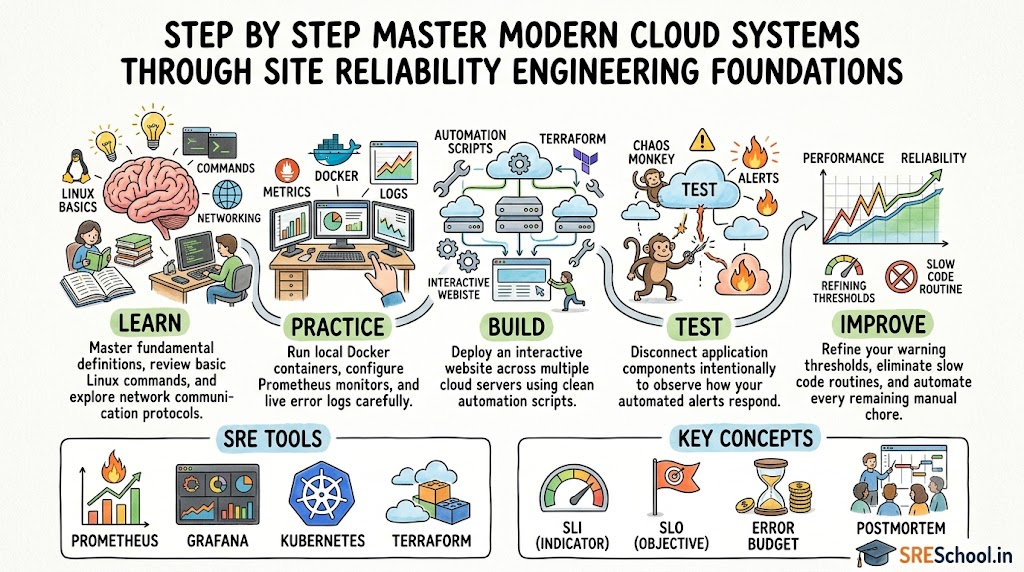
- Learn: Read the basic rules of Linux, networking, and system design. Understand how web pages travel across the internet.
- Practice: Open a terminal and practice typing server commands. Install small programs and inspect their log files.
- Build: Create a tiny web application and run it inside a container. Set up a simple monitoring dashboard to watch CPU usage.
- Test: Break your own application on purpose. Stop the database process and see if your monitoring tool rings the alarm.
- Improve: Write an automated script to restart the app when it fails. Review what broke and make your setup stronger.
Frequently Asked Questions
1. What is an SRE Engineer?
An SRE Engineer is a software specialist who keeps websites and web applications running smoothly. They write automation code to fix servers, balance incoming web traffic, and stop sudden outages. They also partner with developers to release new features safely without causing unexpected downtime for active users.
2. Do I need to know how to code for SRE?
Yes, you need basic coding skills. SRE relies on writing small programs and short scripts in Python, Go, or Bash. These scripts help automate everyday maintenance, configure servers, and clear out old logs. You do not need to build large applications, but you must write code to solve operational tasks.
3. What is the difference between DevOps and SRE?
DevOps is an open team philosophy about bringing software developers and operations teams together. SRE is a specific, practical way to do that work using software tools. You can think of DevOps as a recipe book for teamwork, while SRE is the actual cooking technique used in the kitchen.
4. What does an error budget mean in simple terms?
An error budget is the total amount of downtime an application can safely afford without upsetting customers. If your service targets 99.9 percent uptime, you have a tiny fraction of time left for unexpected bugs. Teams use this leftover budget to try new features and launch updates safely.
5. Can a total beginner learn SRE?
Yes, a beginner can learn SRE with the right guidance. You should start by learning basic computer hardware, networking basics, and simple Linux commands. After you master those fundamentals, you can move forward to study automation, cloud environments, monitoring, and live incident response step by step.
6. How long does it take to learn SRE?
Most learners need three to six months of regular study to master foundational SRE skills. If you study two hours each day, you can learn Linux, cloud tools, container basics, and monitoring systems. Building real personal projects helps you gain confidence much faster than reading alone.
7. What are the most important SRE tools to learn first?
Beginners should start with Linux, Docker, and Git. Docker helps package your code cleanly, while Git tracks code changes over time. After you feel comfortable with those three tools, you can explore Prometheus for tracking health metrics, Grafana for charts, and Terraform for cloud setups.
8. Why is Linux so important for SRE work?
Most cloud platforms and web servers run on the Linux operating system. SREs use Linux command lines to inspect files, check network ports, view logs, and manage computer memory. Knowing how Linux works makes it simple to find bugs and repair servers quickly during an outage.
9. What happens during an SRE incident review?
During an incident review, the entire engineering team sits together to study a recent system crash. They ask why the issue happened, how fast they fixed it, and how to stop it from returning. They never blame individuals, because the main goal is fixing weak tools and bad processes.
10. Is SRE a good career choice in India?
Yes, SRE is an excellent career path in India. Many local and global tech firms in India rely heavily on cloud platforms to run their operations. Companies need skilled engineers who know how to protect complex production systems, automate deployments, and maintain dependable uptime across global regions.
11. Does having an SRE certification help you get a job?
A certification proves that you spent time studying core concepts in a structured order. It shows employers that you understand reliability principles, metrics, and incident recovery. However, pairing your certificate with real hands-on projects and practical home labs makes your resume much stronger to hiring managers.
12. How does SRESchool.in help me get started?
SRESchool.in gives you a clear path through simple tutorials, practical examples, and guided lessons. The platform breaks down hard cloud topics into small, friendly steps. You can study at your own pace, explore real SRE tools, and learn reliable industry practices without feeling confused.
CONCLUSION
Modern companies depend on fast, stable web systems to serve users every single day. Learning Site Reliability Engineering helps you understand how software, networks, and cloud platforms interact under heavy traffic. You master useful skills like writing automation scripts, monitoring system health, and fixing live outages calmly. SRESchool.in provides an approachable learning platform where beginners can explore these essential cloud ideas at a comfortable pace. By combining structured study with regular hands-on lab experiments, you can gain real confidence and build a strong foundation for managing modern cloud platforms.
Leave a Reply