Fundamental Systems for Managing Multi Robot Fleets Across Demanding Commercial Production Sites
Introduction
RobotOps means Robotics Operations. It works like the tools engineers use to run software programs. Robots need daily care after teams build and send them to work. Teams must test them, watch their moves, send updates, and fix broken parts. They also coordinate large groups of machines together. The educational website RobotsOps.com helps people learn about these steps. Engineers build better machines when they understand how robots act during everyday jobs.
What Is RobotOps?
RobotOps covers the entire life of a robot. First, developers write code and design parts. Next, teams place robots inside factories or hospitals. Workers watch the machines to make sure they run safely. Teams also send software updates to add new features. Technicians fix physical parts when motors break. Teams guide the whole group of machines together. They also fix sudden errors quickly. Regular software lives inside clean servers. In contrast, robots move through physical spaces where rain, dirt, and crowds can cause damage.
Why RobotOps Matters
One robot is easy to run. But hundreds of robots create big new challenges. A warehouse robot can stop when a camera lens gets dirty. Another machine might lose its Wi-Fi link. Batteries drain fast when robots carry heavy pallets. Broken wheels can cause bad delays. Robots must never bump into human workers. Teams need central tools to track every machine at once. RobotOps keeps workers safe, keeps machines moving, and prevents costly plant shutdowns.
RobotOps Areas
| RobotOps Area | Simple Meaning | Main Goal |
| Build and Test | Writing code and checking hardware | Stop bugs before field launch |
| Fleet Control | Guiding many machines from one spot | Keep all machines on task |
| Live Monitoring | Watching robot health and signals | Catch errors before parts break |
| System Updates | Sending new software over the air | Keep robots modern and safe |
Robot Fleet Management Made Simple
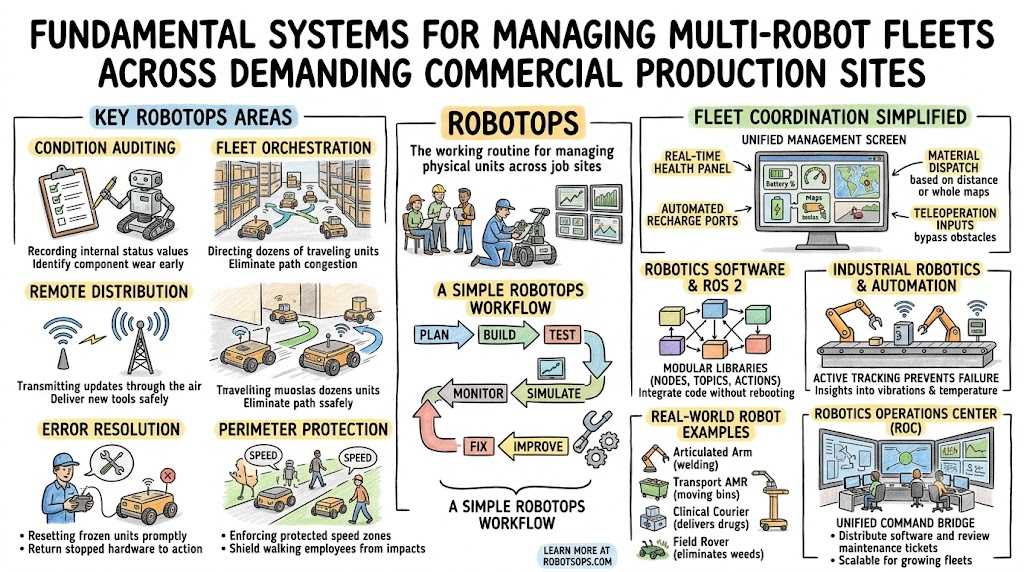
Robot fleet management lets one team run many machines from one screen. Operators check the location of each unit on a live map. They see battery levels in real time. They give tasks to the closest robot. The system raises alerts when a machine gets stuck. Technicians can take remote control to steer it away from obstacles. The team also updates software on every unit at once. This central control keeps the entire fleet healthy, balanced, and productive.
| Fleet Feature | Normal Daily Task | Team Benefit |
| Live Telemetry | Reading motor temperatures | Stops motors from burning out |
| Task Queues | Sending jobs to empty units | Keeps orders moving fast |
| Over-the-Air Updates | Sending software patches | Fixes code without site visits |
Industrial Robotics and Robotics Automation
Industrial robotics powers modern manufacturing. Big robotic arms lift car parts and weld heavy steel frames. Sharp sensors help the arm locate parts on a conveyor belt. Digital controllers tell each motor how fast to spin. Robots assemble delicate circuit boards and pack heavy boxes into shipping crates. Factories use robotics automation to handle hot, repetitive, or dangerous tasks. RobotOps monitors these arms to ensure smooth motor rotation, accurate welds, and zero factory downtime.
Real-World Robot Examples
| Robot Type | Common Work | RobotOps Need |
| Mobile Carrier | Hauling boxes in warehouses | Path tracking and battery charging |
| Factory Arm | Welding steel plates | Heat monitoring and motor checks |
| Hospital Rover | Carrying medicine trays | Door sensor checks and clean maps |
| Floor Scrubber | Cleaning airport floors | Water level alerts and obstacle checks |
Robotics Software and ROS 2
Robotics software acts as the brain that directs robot parts. Many developers rely on ROS 2, which stands for Robot Operating System 2. It helps different parts of a robot speak to one another. ROS 2 uses small programs called nodes. Nodes send messages through channels called topics. When a robot needs to finish a bigger job, it uses actions. These tools let sensors, motors, and cameras share live data smoothly. RobotOps teams use ROS 2 to run checks and track robot behavior.
Robot Simulation Before Real Deployment
Robot simulation means testing a robot inside a computer world before putting it on a real floor. Engineers build a digital twin of a factory. They drive virtual robots over ramps and past digital walls. They test camera views, sensor inputs, and navigation software. They can run hundreds of virtual tests without breaking physical metal parts. However, simulations cannot copy real life perfectly. Dust, wet floors, and loose wires still require real-world testing.
Autonomous Mobile Robots
Autonomous mobile robots move around rooms without humans driving them. In a large warehouse, these rolling carts use lidar sensors to map their paths. They see boxes, walk around pallets, and steer clear of people. They lift heavy crates and roll across long floors. When batteries run low, they drive themselves to charge docks. RobotOps platforms coordinate these carts, hand out pickup orders, and keep aisles clear so traffic never jams.
Robotics Operations Center
A Robotics Operations Center works like an airport control room. Operators sit in front of large screens to watch live robot fleets across multiple cities. The screens show sensor alerts, battery levels, and wireless signal strength. Technicians read live data streams and track software errors. If a cart gets stuck, an operator takes remote control to guide it back on path. This central setup helps companies manage thousands of robots with a small team.
Real-Life Scenarios
- A warehouse cart stops when a loose shipping label covers its lower navigation camera, triggering an instant alert to the main control screen.
- A factory arm motor gets hotter than normal during welding, so the system schedules a motor swap before the assembly line halts.
- A hospital delivery rover loses its Wi-Fi signal inside a metal elevator, switches to offline safety mode, and reconnects once the doors open.
- Fifty rolling robots download a new route map overnight while charging, waking up ready for morning warehouse orders.
Common Mistakes to Avoid When Choosing Delhi Events
- Picking an event venue without checking if nearby roads face heavy rush-hour traffic jams.
- Booking outdoor lawns during peak summer heat or heavy monsoon downpours without weather tents.
- Forgetting to verify local sound rules that stop loud music after ten at night.
- Choosing a hall that lacks enough secure parking spaces for your guests.
- Skipping in-person checks of the venue’s electrical setup and backup generator capacity.
- Hiring caterers who lack valid local food safety permits and cold storage.
- Overlooking the nearest metro station links for guests who use public transit.
- Signing venue agreements before confirming all extra fees for cleaning and power usage.
How RobotsOps.com Helps Learners
The educational platform RobotsOps.com teaches the practical skills needed to run modern robots. Learners study real-world guides on RobotOps, industrial robotics, and robot simulation. The site covers ROS 2 code, robotics software, and fleet management practices. Readers learn how Autonomous Mobile Robots navigate busy sites and how a Robotics Operations Center coordinates machines. The lessons explain clear operational ideas to help students and working engineers run reliable automation systems.
A Simple RobotOps Workflow
- Plan: The engineering team lists robot tasks, safety limits, and site rules.
- Build: Developers write robot code and assemble physical motors, sensors, and chassis.
- Test: Technicians test robot parts on workbenches to check base functions.
- Simulate: The team tests virtual robots inside digital worlds to find hidden software bugs.
- Deploy: Engineers bring physical robots into real factories to start active work.
- Monitor: Central systems watch battery health, sensor feeds, and travel paths.
- Fix: Operators clear errors, adjust navigation maps, and replace worn parts.
- Improve: Developers use field data to send software updates and boost robot performance.
Frequently Asked Questions
1. What does the term RobotOps mean in robotics?
RobotOps means Robotics Operations. It is the practical discipline of managing physical robots after engineers build them. Teams use it to test, update, monitor, and repair active robots. It makes sure factory arms, rovers, and medical robots work safely all day long. It blends modern software practices with physical machine care.
2. Why can we not treat robots like simple cloud software?
Pure software lives inside controlled computer servers. When software crashes, you can restart it with code. Robots have motors, gears, wheels, and sensors that wear out over time. They work around people, heavy machinery, and bad weather. RobotOps handles these physical dangers, hardware wear, and changing work environments.
3. How does Robot Fleet Management help large factories?
Fleet management tools show all machines on a central computer screen. Plant managers see battery levels, active routes, and error codes at a glance. They assign tasks to open units without delay. This central view prevents traffic jams on the floor and stops broken machines from slowing production.
4. What role does ROS 2 play in modern robot systems?
ROS 2 is a software framework that lets robot sensors, processors, and motors communicate. It breaks complex programs into smaller nodes that share data over topics. Developers use ROS 2 to build navigation systems, vision tools, and control loops. It works cleanly with monitoring tools inside a RobotOps pipeline.
5. Why do engineers run simulations before real deployments?
Virtual simulations let engineers test code inside safe digital environments. Teams can crash a digital robot thousands of times without damaging expensive metal parts. They check how software handles blind spots, steep ramps, and blocked paths. Simulation saves time, lowers project costs, and makes real-world tests much safer.
6. How do Autonomous Mobile Robots navigate inside busy warehouses?
Autonomous Mobile Robots use onboard lidar, cameras, and wheel sensors to build internal room maps. They calculate the best path from storage racks to packing stations. When a worker walks into the aisle, the robot slows down or turns. RobotOps tracks their positions and schedules battery charging cycles.
7. What happens inside a Robotics Operations Center?
A Robotics Operations Center serves as the central control room for robot fleets. Technicians watch live data dashboards, respond to alarms, and push software patches. If a mobile unit gets confused by dynamic clutter, a remote operator can steer it away. The center keeps large fleets running smoothly across many facilities.
8. Why are over-the-air software updates important for robots?
Over-the-air updates let teams upgrade robot software without visiting every unit with a cable. Engineers send bug fixes and map updates over secure Wi-Fi while robots charge. This keeps the fleet running on the latest software version. Safe rollout tools ensure faulty code does not strand machines.
9. How does predictive maintenance prevent costly factory downtime?
Predictive maintenance uses sensor telemetry to spot worn parts before they break. Systems track motor temperatures, strange vibrations, and current spikes during regular runs. When readings move outside safe ranges, the software flags the unit for service. Technicians replace bearings before a breakdown stops the entire assembly line.
10. What is a digital twin in robotics operations?
A digital twin is a computer model that matches a physical robot working in the field. The digital model receives live telemetry from the real machine. Engineers study the twin to run virtual tests, simulate new routes, and spot performance bottlenecks. This mirrors operations without interrupting the physical robot.
11. How do teams secure robot fleets against cyber threats?
Teams protect robot fleets by encrypting data sent between machines and central servers. They use secure network keys and block unauthorized control access. Software patches fix known bugs over protected wireless links. Isolating robot traffic on private networks prevents outside intruders from hijacking physical machine controls.
12. What educational resources does RobotsOps.com provide for learners?
RobotsOps.com provides articles, practical guides, and technical explanations focused on modern robotics operations. Learners study topics like fleet management, ROS 2 middleware, autonomous mobility, and robot simulation. The platform helps developers, operators, and students understand how to deploy, monitor, and scale robot fleets in real environments.
Conclusion
RobotOps is essential for keeping modern machines productive and safe in active workplaces. Building a smart robot is only the first step. Growing companies must master fleet management, robotics software, digital simulation, and industrial automation. ROS 2 networks and Autonomous Mobile Robots require continuous live monitoring and regular software updates. Teams that use structured operational workflows avoid unexpected downtime and protect human workers. Platforms like RobotsOps.com give students, engineers, and plant managers the knowledge they need to build and run reliable robot fleets.
Leave a Reply