Preparing For Top DevOps Certifications While Building Practical Production Grade Engineering Projects
Introduction
A DevOps roadmap gives learners a clear plan to build software skills step by step. Beginners often feel lost because tech has so many tools, terms, and paths to choose. You do not need to study every tool on day one. Instead, you need a smart order that starts with basic computer skills. First, you learn how to give commands to computers. Next, you learn how teams save code and share files. Then, you learn how to send programs to the web automatically. So, a clear plan stops confusion and saves your precious time. You can learn fast when you take one small step every single day. This simple guide helps you grow real skills without stress.
What Is a DevOps Roadmap?
DevOps connects the people who make software with the people who run it. A roadmap is a learning map with clear steps for your journey. Many beginners make the big mistake of chasing every shiny new tool. But tools change very quickly in the computer world. Basic skills stay useful for your entire work life. So, you should focus on strong core ideas first. You learn to solve real problems with computers. Then, you can pick up any new tool in a few days. A good map keeps your daily study focused and calm.
A Simple DevOps Learning Path
You should learn core skills in a clear order from basic to advanced. First, you study Linux because servers run on it. Linux is a free computer operating system. Next, you learn Git to track changes in your code files. Then, you learn computer networking so apps can talk to each other. After that, you study the cloud to rent servers online. Next, Docker packages your apps into neat boxes called containers. Then, CI/CD tools test and ship code fast. Next, Kubernetes manages these app boxes across many servers. Finally, you set up security to protect your data.
| Learning Stage | Main Skills | Simple Goal |
| Stage 1: Basics | Linux, Git, Networks | Run commands and save code |
| Stage 2: Packaging | Cloud, Docker Containers | Put apps in neat boxes |
| Stage 3: Delivery | CI/CD Pipelines | Test and ship code fast |
| Stage 4: Scale | Kubernetes, Code for Servers | Manage big apps safely |
| Stage 5: Safety | Monitoring, Cloud Security | Spot errors and block threats |
DevOps Engineer Roadmap
A great DevOps engineer roadmap connects all these skills through real work. You write small scripts to automate boring daily chores. Then, you bundle an application inside a clean Docker container. Next, you build a pipeline that tests code every time someone saves work. Also, you write code that sets up fresh cloud servers automatically.
For example, imagine you build a simple photo sharing website. You write the code and save it with Git. Next, you write instructions to run the site in Docker. Then, your automated pipeline tests the site and deploys it to a cloud server. Finally, your monitoring tool sends an alert if the site goes down. Now, you understand the whole system from start to end.
DevOps Tools You Should Understand
You do not need to memorize every tool name today. Just understand the main tool groups and what they do.
- Source Control: Tools like GitHub save your code history and help teams work together.
- Containers: Tools like Docker wrap your app and its files into one neat package.
- CI/CD: Automation tools like Jenkins test and ship your software updates fast.
- Orchestration: Tools like Kubernetes organize and run thousands of app containers at once.
- Infrastructure as Code: Tools like Terraform set up cloud servers by reading simple text files.
- Monitoring: Tools like Prometheus watch server health and count system visitors.
- Logging: Tools like Grafana Loki collect error messages in one place for easy reading.
- Cloud Platforms: Providers like AWS rent computer power across the whole world.
- Security: Tools like SonarQube scan your code to catch bugs and safety flaws early.
- GitOps: Tools like ArgoCD use Git files to update live apps automatically.
| Tool Area | Purpose | Example Tools |
| Code Storage | Save code and work with teams | Git, GitHub, GitLab |
| App Packages | Box apps so they run anywhere | Docker, Podman |
| Automation | Test and deploy code fast | Jenkins, GitHub Actions |
| Cloud Servers | Rent computers over the web | AWS, Azure, Google Cloud |
| System Watch | Check app health and fix bugs | Prometheus, Grafana |
DevOps Tools Comparison Made Simple
Teams must pick the right software tools very carefully. A popular tool might not fit your specific project at all. First, check the exact purpose of the tool. Next, look at the learning curve to see if your team can learn it quickly. Also, check the real money cost of running the software every month.
You must also check if the tool works well with your current cloud. Good security features and helpful user communities matter a lot too. A simple tool often beats a huge, complex tool that breaks easily. Always pick the tool that solves your main problem with the least fuss.
DevOps Certifications Roadmap
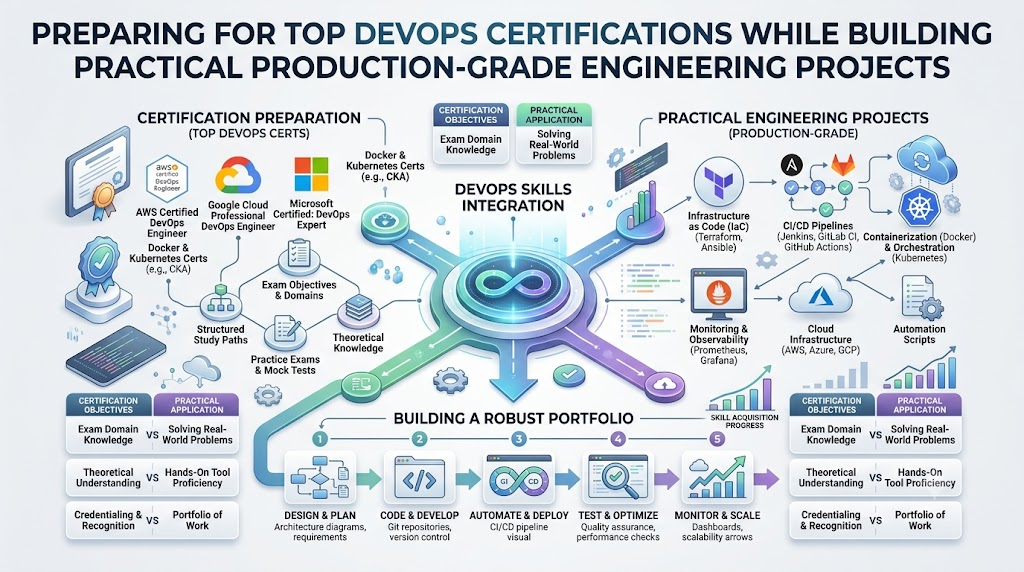
Certifications show employers that you understand key technical ideas. But you should not rush to collect paper badges right away. Beginners should first build real computer projects at home. Once you understand the basics, pick one good cloud or Linux test.
Look up the exam cost and study guides before you register. Most exams make you renew your badge every two or three years. You prepare by reading official guides and doing hands-on labs daily. Remember, tests alone will never guarantee you a dream job. Practical projects prove your real worth much better than test scores. Use exams only as extra proof of your hard work.
SRE Roadmap
SRE stands for Site Reliability Engineering. SRE engineers make sure websites stay fast and never crash. You use your core DevOps skills as a strong base here. First, you learn deep Linux, network paths, and cloud systems. Next, you study monitoring tools to catch errors before users see them.
Then, you set up clear alerts so the team can fix broken servers fast. You write scripts to fix common server problems without human help. Also, you plan server capacity so busy holiday traffic does not break your apps. SRE keeps apps running smoothly every second of the day.
Platform Engineering Roadmap
Platform engineering is another exciting path for skilled tech workers. Platform engineers build internal tools for their own company developers. You combine cloud servers, containers, Kubernetes, and automated pipelines into one easy portal. Then, developers can push their code without asking for server help every time.
For instance, think of an internal self-service company website. A developer clicks one single button to get a test database. The platform creates the database safely in two minutes. The developer stays happy, and the platform team keeps the system safe and tidy.
Real-Life Scenarios and Experiences
Here are realistic examples of how engineers use these skills at work:
- Handling Busy Shopping Days: An online toy store expects millions of buyers on a holiday. The engineer writes rules to add ten cloud servers automatically when traffic rises. The site stays fast, and shoppers buy gifts without any errors.
- Stopping Bad Bugs Fast: A developer pushes code that contains a broken link. The CI/CD pipeline runs tests automatically and spots the mistake in three seconds. The pipeline blocks the bad update, so real users never see the bug.
- Fixing Server Outages: A database runs out of memory at midnight and stops working. A monitoring tool sends a phone alert to the engineer on duty right away. The engineer reads the system logs, adds more memory, and restarts the app.
Common Mistakes to Avoid When Choosing Career Steps
Many learners make simple mistakes when they study modern engineering. Here are common errors and easy ways to fix them:
- Learning Too Many Tools at Once: Beginners try to study ten tools in one week and feel tired. Pick one tool, master it, and then move forward.
- Skipping Linux Basics: Some learners jump to Kubernetes without knowing simple Linux commands. Learn basic terminal commands first because all servers use them.
- Ignoring Computer Networking: Many people do not know how web traffic moves. Spend a week learning IP addresses, ports, and routers.
- Only Watching Video Lessons: Watching videos creates a fake feeling of real skill. Open your computer terminal and type commands yourself every single day.
- Collecting Too Many Badges: Some people spend money on tests but cannot build a basic app. Build three solid web projects before buying exam vouchers.
- Ignoring Code Security: Beginners often leave passwords visible in open public files. Always hide secret keys and scan your code for bugs early.
- Not Reading System Logs: Many learners panic when an error screen shows up. Read the error lines calmly because the screen tells you what broke.
- Studying Alone in Silence: Some learners never ask questions when they get stuck on code. Join open study groups to share answers and learn with friends.
How DevOpsSchool Fits Into Your Learning Plan
DevOpsSchool provides free learning guides to help you grow step by step. You can follow structured 90-day learning plans for DevOps, SRE, and platform roles. Their open technology directory lets you compare tools across clouds, containers, and pipelines.
Learners can use their clear labs, quick tutorials, and technical term glossaries to practice daily. The site also offers certification roadmaps and exam registries to track your goals. You can explore career resources to see what modern engineering teams expect from candidates. It acts as an organized digital map while you build your hands-on projects.
DevOps Jobs and Career Growth
Learning DevOps opens doors to many fun technology jobs. You can work as a DevOps Engineer, SRE, Cloud Engineer, or Platform Engineer. DevSecOps engineers focus on keeping automated pipelines totally safe from internet attackers.
You prepare for these jobs by building a strong portfolio of real projects. Practice explaining how you fix broken servers and how you automate tasks. Employers love candidates who stay calm, troubleshoot bugs clearly, and communicate well with teammates. Keep your sample code online so hiring teams can see your actual skills.
Frequently Asked Questions
1. What does a DevOps engineer do every day?
A DevOps engineer helps teams build, test, and release software quickly and safely. They write code to set up cloud computers automatically. They also build pipelines to test apps and watch live systems for errors. Their main daily goal is to help developers ship useful features to users without breaking the website.
2. Can I learn DevOps without any coding skills?
Yes, you can start learning DevOps as a total beginner today. You do not need to write big complex software programs like a full-time software coder. But you should learn simple script languages like Python or Bash over time. Scripts help you automate boring daily computer chores and manage your servers very easily.
3. How long does it take to learn basic DevOps?
Most dedicated learners need about six months of steady daily practice to grasp the basics. You spend the first two months on Linux, networks, and Git. Then, you spend two months on Docker, cloud basics, and pipelines. Finally, you spend two months building complete projects and practicing real interview questions.
4. Which operating system should I learn first?
You should definitely learn the Linux operating system first. Most internet servers, cloud computers, and containers run on Linux flavors like Ubuntu. You do not need to be a kernel expert. Just learn how to move between folders, edit text files, manage user permissions, and check active system processes.
5. What is the difference between DevOps and SRE?
DevOps focuses on breaking down walls between coders and operations teams to ship software faster. SRE focuses on making sure large live websites stay fast, healthy, and reliable for customers. SRE uses software engineering tricks to solve server problems, track error budgets, and stop site outages before they happen.
6. Are cloud certifications necessary to get a job?
No, cloud certifications are not strictly required to get your first technology job. Many companies care much more about your practical hands-on skills and real project work. But a good certification can help your resume stand out to busy recruiters. Think of badges as helpful extra proof of your study efforts.
7. What is Infrastructure as Code?
Infrastructure as Code means you write text files to build and run cloud servers automatically. Instead of clicking buttons on a website screen, you write simple setup files. A tool then reads your text files and creates servers in minutes. This makes your computer setups fast, repeatable, and very easy to track.
8. Which cloud platform should a beginner pick?
Beginners should pick one major cloud platform like AWS, Microsoft Azure, or Google Cloud. AWS is a very popular choice with many learning guides. The basic ideas stay the same across all three major providers. Once you master core storage and virtual computers on one, you can switch easily.
9. What is a CI/CD pipeline?
A CI/CD pipeline is an automated conveyor belt for computer software code. When a programmer saves new code, the pipeline wakes up automatically. It checks the code for errors, runs safety tests, and packages the app. Finally, it sends the clean update to live web servers without any human delay.
10. How can I practice DevOps skills for free?
You can practice almost every modern DevOps skill for free at home. Git, Linux, Docker, and Kubernetes have free versions you can run on a laptop. Major cloud providers also give free accounts with limited computer power for twelve months. You only need your home computer and an open mind.
11. What is Platform Engineering?
Platform Engineering is the practice of building internal tools for software developers inside your company. Platform teams create a simple self-service system where coders can grab databases and test servers fast. This allows developers to ship their own work safely without waiting on a server administrator for help every day.
12. How do I prepare for a junior DevOps interview?
Prepare by building two or three complete projects that you can show and explain. Practice speaking about how you solved real errors during your project setups. Be ready to run basic Linux commands, write a small script, and explain how a web request moves through a network to a live server.
Conclusion
Starting your software learning journey feels exciting when you follow a clear path. Always start with the basics like Linux, networks, and Git before touching fancy tools. Learn one skill at a time, and practice by building real projects on your computer. Do not waste time chasing every single tool name you see online. Use professional certifications only as supporting evidence for your real technical ability. Later on, you can explore advanced tracks like SRE and platform engineering. Keep learning by solving real computer problems every week, and celebrate your steady personal growth.
Leave a Reply