Smart Digital Workflows Shield Fast Growing Software Platforms From Unplanned Downtime Hazards
Introduction
AIOps means Artificial Intelligence for IT Operations. It helps computer systems run smoothly every single day. Modern tech teams manage giant piles of data from apps and servers. People cannot read all this fast data alone anymore. So, smart programs step in to watch the systems. They catch bugs before users notice any slow screens. In this simple guide, you will learn the basics of smart IT tools. You will also see how teams use these tools to fix errors fast and build strong computer systems.
What Is AIOps?
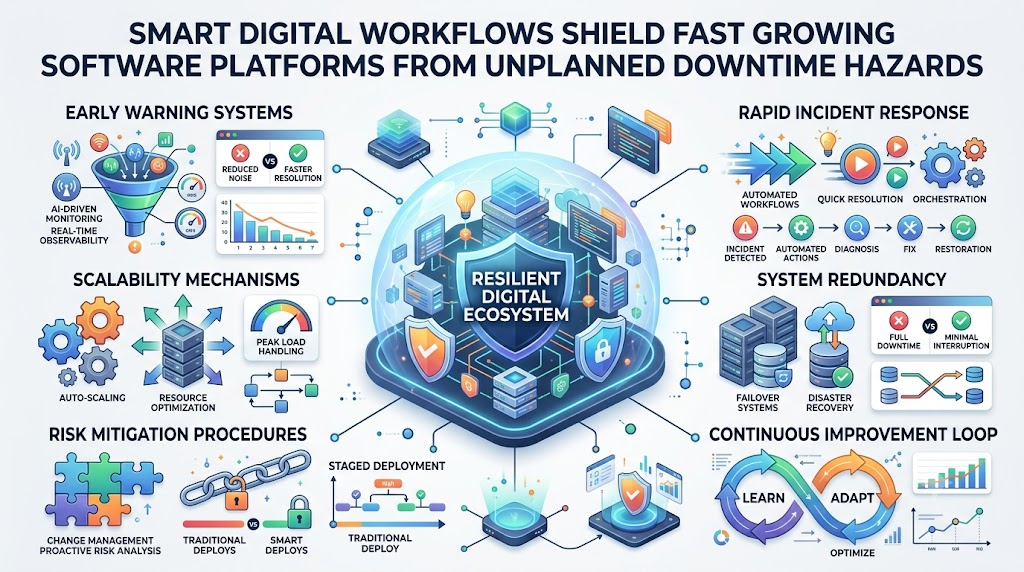
AIOps uses artificial intelligence to help computer teams fix system problems. Artificial intelligence means computer code that acts smart like a human brain. Machine learning helps these smart programs learn new patterns from old system activity. IT teams use monitoring to watch computers, networks, and apps all day. Systems create metrics, which are numbers that show health like speed or heat. They also make logs, which are written diary notes about every action. When an event or special action happens, systems write it down. Next, the smart tool uses alert analysis to sort through thousands of warnings. It groups related warnings together so workers see only real trouble. Then, it uses root-cause analysis to find the main hidden bug behind an outage. Finally, automation runs pre-set steps to fix basic problems without human hands.
Why Do IT Teams Need AIOps?
Modern tech setups run across giant clouds and many connected servers. Because these setups are huge, machines create too many alerts every minute. Workers feel tired when loud alarms buzz all day without pause. They waste hours clicking on repeated incidents that happen again and again. Also, slow manual work makes fixing big problems take too long. A single broken part can hide inside millions of diary logs. But smart operations tools read these fast streams of data in seconds. They spot strange changes early and point right to the core error. However, smart software does not fix every single broken tech item. Human engineers still need to make big choices and write new rules. The system just clears the loud noise so workers can think clearly.
AIOps Tasks and Benefits
| AIOps Task | Simple Meaning | Possible Benefit |
| Log Reading | Reading system diary notes | Finds hidden bugs faster |
| Noise Reduction | Hiding duplicate warning alarms | Keeps workers calm and focused |
| Anomaly Catching | Spotting weird numbers or speeds | Warns teams before crashes happen |
| Event Linking | Connecting related alarms together | Shows the true main issue |
| Root Cause Search | Finding the first broken part | Saves hours of guessing time |
| Self-Healing | Running safe automated fixes | Solves simple bugs in seconds |
What Does TheAIOps.com Offer?
TheAIOps.com shares clear guides about Artificial Intelligence for IT Operations for everyone. Learners can study structured AIOps Training to build strong hands-on skills with data. You can also explore an AIOps Course to understand system design and smart alerts. If you want to test your skills, you can review an AIOps Certification program. Teams can read about each top AIOps Platform to pick the best software. The platform also gives advice on AIOps Consulting and practical AIOps Services. These services help businesses test their tools and set up automated workflows safely. Every AIOps Engineer can use these open resources to grow on the job.
AIOps Training and AIOps Course
A good AIOps Course teaches learners how to handle real computer data step by step. First, students study AIOps basics to see how smart tools track big networks. Next, they practice data collection by gathering logs, metrics, and network traces. Then, they study alert management to turn thousands of buzzing alarms into clean signals. Anomaly detection teaches you how to spot weird spikes in computer memory use. Learners also explore root-cause analysis to trace a crash back to a bad code update. Finally, students set up simple automation to restart stuck apps safely. Hands-on practice matters most because real computer setups break in strange ways. Book reading helps a little, but working with broken apps teaches real skill.
AIOps Learning Areas
| Learning Area | What Learners Should Practice |
| Data Ingestion | Pulling logs and system numbers into one safe bucket |
| Noise Filtering | Grouping duplicate alarms so workers see only one notice |
| Pattern Matching | Finding past bugs that look like current system issues |
| Smart Alerting | Sending warnings only when actual business services drop |
| Root Analysis | Tracing errors across servers to find the first failure |
| Auto-Fix Rules | Writing safe scripts that restart crashed background programs |
| Model Tracking | Checking machine learning math so it stays accurate over time |
| Team Dashboards | Building visual charts that show system health in plain view |
AIOps Certification and AIOps Engineer Skills
An AIOps Certification proves that you understand core tools, data flows, and smart rules. It shows managers that you spent time studying modern system operations. However, a paper test alone will never make you an expert engineer. Every skilled AIOps Engineer needs strong day-to-day monitoring skills and sharp troubleshooting habits. You must know how to read charts and track down weird system slowdowns. Next, you need good coding habits to build safe automation tasks. You also need basic math skills to understand how smart algorithms find patterns. Clear communication matters just as much because you must explain bugs to teammates. Building real practice labs will prepare you better than memorizing test answers.
AIOps Tools and AIOps Platform
An AIOps Platform brings many separate tracking systems together into one central screen. It gathers monitoring tools that check hardware and observability tools that track software paths. It also connects log tools that store system notes and incident tools that wake up on-call workers. Analytics tools then run math models across all this combined information in real time. But teams must pick their tools with care instead of buying every shiny app. First, look at your real business needs and find your biggest daily headaches. Check if the tool connects smoothly with your existing cloud servers. Also, review the money cost, data safety rules, and your team’s current skill level. Good tools must scale easily as your company adds more apps and users.
AIOps Implementation: How Does It Work?
Teams should start an AIOps Implementation by picking one clear, painful problem to fix. Do not try to change your whole tech department in a single afternoon. First, collect clean, useful data from the servers that cause the most trouble. Connect those key systems into your new platform so it can see events. Next, set up basic rules to reduce loud, repetitive alert noise. Turn on anomaly detection so the tool learns what normal traffic looks like. Then, test how the system groups related alarms during busy work hours. When you trust the data, test small automated steps like clearing full disk drives. Always keep human approval buttons ready for risky tasks like database changes. Measure your time savings every month, fix any small mistakes, and expand slowly.
AIOps Consulting and AIOps Services
Many growing companies use AIOps Consulting to plan their move toward smart operations. Expert AIOps Services help teams inspect their current servers, tools, and daily team habits. These specialists suggest the right software and design a smooth setup plan. They also help workers connect different cloud systems and write custom alert rules. Furthermore, outside advisors teach internal staff how to read new machine learning charts. But leaders should always set clear business goals before spending money on outside help. Know whether you want fewer night calls, faster incident fixes, or cheaper server bills. Clear goals help your team measure real value from every consulting dollar spent.
Real-Life Scenarios / Experiences
- An online store suffered slow checkout pages during a huge holiday shopping rush. The smart operations tool grouped four hundred alarms into one main alert. It showed that a tiny payment server had run out of memory. The team fixed the single bad server in three minutes.
- A bank app kept sending false alarms to engineers in the middle of the night. A smart platform learned the normal nightly backup cycle over two weeks. It silenced those safe recurring spikes automatically so the on-call engineers could sleep.
- A cloud hosting company faced broken app servers after a bad weekly software patch. The automated system spotted the failing servers right away. It rolled back the update safely before any regular bank customers noticed an error.
How TheAIOps.com Can Help
TheAIOps.com provides independent educational content for engineers and modern IT leaders. The site breaks down complex artificial intelligence topics into simple, step-by-step reading modules. You can compare different enterprise platforms without reading heavy sales pitches. Learners can explore guides on certification paths and foundational engineering skills. Teams can also review neutral advice on consulting options and smart tool rollouts. This open knowledge base helps you make smart choices for your career and company.
A Practical Implementation Approach
Start your project small by focusing on a single noisy app that wakes up engineers. Gather clean log data and accurate health numbers from that one target service. Next, send those data streams directly into your smart analytics engine. Create clear rules to filter out harmless network blinks and repeated alarms. Then, let the algorithm watch normal traffic patterns for several weeks. Test anomaly warnings against real outages to verify that the tool works well. Next, write simple automation scripts to handle safe, routine recovery chores. Always require a human engineer to approve big actions that change customer data. Track your mean time to fix errors to see if numbers improve. Once your team gains deep confidence, add more apps to the platform step by step.
Common Mistakes to Avoid
- Trying to automate every complex system task on the very first day.
- Feeding dirty, broken, or incomplete data logs into your smart algorithms.
- Turning on automated fixes without setting up human review steps for safety.
- Buying an expensive software suite before defining your actual business problem.
- Ignoring your current team by failing to train them on new tools.
- Expecting machine learning models to solve bad software architecture instantly.
- Leaving default alert levels on, which creates tons of useless warning noise.
- Forgetting to update smart models when your engineers change app code.
Frequently Asked Questions
1. What does AIOps mean in simple terms?
AIOps means using smart computer programs to help humans run computer networks smoothly. These smart tools read data from apps, servers, and cloud systems all day. They find weird bugs and silence useless alarm bells fast. Then, they guide engineers toward the main source of trouble.
2. Can AIOps replace human IT workers?
No, smart tools do not replace real human tech workers at all. They simply take care of boring, repetitive tasks like sorting loud alarm warnings. Human engineers still make key decisions, fix tough code problems, and design safe systems. The software works as a helpful helper for workers.
3. How does machine learning help IT teams?
Machine learning looks at past computer events to learn normal everyday traffic patterns. When system numbers jump or drop in strange ways, the tool notices right away. It flags these weird changes as anomalies before regular computer users ever see an error on their screens.
4. What is the difference between monitoring and AIOps?
Basic monitoring just watches servers and rings a bell when something breaks. It often sends hundreds of buzzing alarms for a single small bug. In contrast, smart operations tools read all those alarms together. They group related messages and show the true root cause behind the noise.
5. Do small companies need smart operations tools?
Small companies with simple, single-server setups usually do not need smart operations software. Standard free monitoring tools work fine for basic apps. But when a company grows and manages hundreds of cloud services, smart operations tools become very helpful for handling the giant flood of daily data.
6. What skills does an AIOps Engineer need most?
An engineer needs solid IT monitoring knowledge and good operating system basics. You should know how to read system logs and network speed numbers. Basic coding skills help you write automation scripts for common tasks. Good team communication skills are also vital for explaining complex technical fixes.
7. Why do implementations sometimes fail?
Many projects fail because leaders try to fix too many complex systems at once. Other teams feed messy, incomplete log data into their new software tools. Without clean data, the smart engine makes bad guesses. Teams must start small, use clean data, and train their staff properly.
8. What is alert noise in computer systems?
Alert noise happens when broken servers send thousands of repetitive warning messages at once. Most of these noisy alarms point to the exact same underlying glitch. Workers get tired and miss real emergencies. Smart tools silence the harmless duplicates so workers can focus on real emergencies.
9. How does root-cause analysis work?
The software traces data paths across apps, networks, and databases during a crash. It spots which single piece of equipment failed first in the timeline. Instead of guessing across twenty servers, engineers see the exact broken item immediately. This smart tracing saves hours of stressful detective work.
10. Is an expensive platform always required?
No, teams do not always have to buy giant, costly enterprise software suites. Many teams connect lightweight open tools to start reading their system logs better. You should only buy a big commercial platform when your team outgrows basic tools and needs advanced cross-system event correlation.
11. How does automation help IT operations?
Automation runs pre-written computer commands without making a human click buttons manually. For example, it can restart a frozen web server in two seconds. It can also clean full hard drives automatically. This fast response keeps websites running smoothly even during busy holiday weekends.
12. Where can beginners learn about smart operations?
Beginners can study clear online guides, read vendor documents, and build home testing labs. Platforms like TheAIOps.com provide helpful learning paths, tool overviews, and certification advice. Practicing with basic server logs and free monitoring tools helps you build solid practical skills for modern technology careers.
Conclusion
Modern technology environments grow larger and more complex every single day. Teams need smart tools to tame noisy alerts and spot critical system failures early. Learning the basics of data collection, root-cause analysis, and safe automation helps you build dependable cloud systems. You do not need to automate everything on day one. Start with one small system headache, clean your metrics, and test your rules carefully. Resources like TheAIOps.com offer practical guidance for your learning journey. With patience, good data habits, and steady practice, any engineer can master these modern operational tools.
Leave a Reply